FIELD NOTE VUE · FRONTEND ARCHITECTURE
How I kept a growing Vue dashboard maintainable
I joined JigSpace in 2021, when its Vue 2 Dashboard was already in use. This note covers three things I did over the next five years: cutting the work the app did at startup, deciding where shared code should live, and testing the move to Vue 3.
// How I work · Engineering decisions
Reducing startup work
JigSpace teams used the Dashboard to manage and share their 3D presentations, which we called Jigs. The team directory gave me a simple way to spot wasted work. I could compare what was on screen with what the browser requested to put it there. If the directory doubled in size tomorrow, showing the same first ten teams should still take about the same work.
With a staff account, the directory of all teams took several seconds to render. The API had no pagination, so the page fetched every team’s full record. Ten rows were visible, but the page requested logos for the whole directory. I limited those requests to the visible page. The larger issue was one level up. Opening the Dashboard with a staff account could fetch every team to fill the team switcher. I changed startup to load only the signed-in person’s memberships. Staff could still reach another team by ID while we waited for a paginated search endpoint. Once it was available, I connected the directory to it, so the app only looked up a team when someone searched for it.
I applied the same reasoning to JavaScript. Our Vue setup registered components by importing the whole directory up front. I switched registration to load a component when it was needed and moved an animation library out of the base HTML. Someone arriving at sign-in had no use for the animation inside a later workflow. For each startup request, I learned to ask which user action made it necessary.
Where shared code belongs
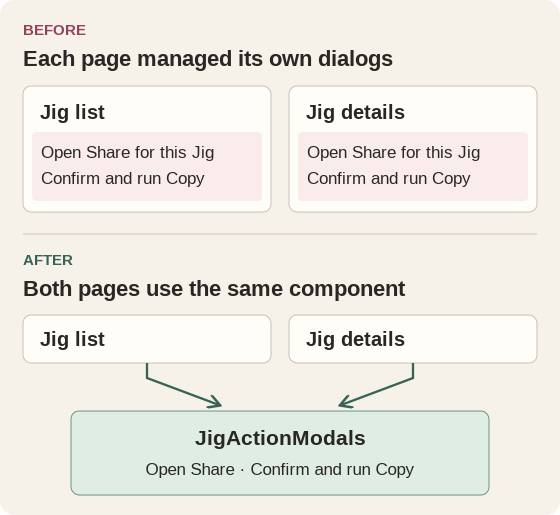
My Jigs and Team Jigs both needed sorting, pagination and row selection, so I put those interactions in a shared table. Share looked like another row action until I followed it to its other entry point. Someone looking at a Jig’s details could open Share too. There was no table on that page, but the same permissions had to apply.
I extracted the action dialogs so both pages could open the same Share flow, and brought the permission checks together in a shared mixin. After that, a change to row selection started in the table. A change to who may share started in the common permission check, and had to be verified from both entry points. The sharing flow also held what an editor sees when two people edit the same Jig and one save conflicts with the other.
I used a similar test for boundaries in the Vuex store. Could one part change independently? I tried moving Jig data and team data into separate modules. The Jig module worked on its own. Moving team state broke part of authentication, so I backed out that split. Keeping that dependency together meant a future change to sign-in could be understood in one place.
Testing the Vue 3 migration
A teammate started our move to Vue 3 with a coding agent and raised one large pull request. When I reviewed it I found more than a dozen blockers, so I took it over. Some were configuration problems and some were incompatibilities. Working through them, I found the move from Vuetify 2 to Vuetify 3 had not been done at all. I fixed them step by step until the Dashboard was ready to release, and improved performance where I could along the way. It shipped to production two months later.
To check each change, I worked with a coding agent to bring across the Playwright end-to-end tests I had built for the Vue 2 Dashboard. They signed in against a real backend and opened pages such as My Jigs. For each page in the route checks, we captured a screenshot and checked for browser errors and failed server responses. That gave us a repeatable starting point while changes were still landing in Vue 2.
One check I cared about was whether a person could switch teams and refresh the browser without losing their place. Clicking through an already-open Dashboard didn’t test two things a fresh load depended on. The Jig library had to wait until the active team was known before requesting its rows. And if someone belonged to two teams, startup had to restore the one they had chosen before fetching its data.
I fixed both in Vue 2 and worked with a coding agent to carry the changes into Vue 3. In staging, twenty cold loads each returned the expected fifty rows. A separate check switched between two of the account’s teams and refreshed, to confirm the rows belonged to the chosen team.
Reading the E2E report
I also wanted anyone reviewing a build to be able to tell what we had tested. Jenkins showed each test as passed, failed or skipped, and the HTML report let a teammate open the screenshot for a particular page. There was a catch. Signing in was itself a test, so it could pass even if every check after login was skipped. I added a check for each expected group of tests. If all we had was a successful login, Jenkins marked the build unstable.
What I’d carry forward
When I first restricted the logo requests, I could check the result just by opening the network panel and turning the page. Later, checking a change meant opening the same Jig as two editors, or signing in as someone who belonged to two teams. Staying with the Dashboard long enough to see those situations recur changed what I look for in a refactor. I want the next engineer who changes sharing to have one place to change the rule, and a browser test that shows what the person using it will experience.