FIELD NOTE WEB ARCHITECTURE · THREE.JS
Two generations of the JigSpace web viewer
I helped build the Babylon.js viewer, including video textures and editable text boxes, and later owned it. A teammate started the Three.js rewrite with coding agents while the rest of us worked on our AI platform. I joined later to help get the new viewer ready for launch, took it over when it shipped and built its quiz interactions.
// How I work · Engineering decisions
From one cube to a working beta
In 2021 we had an early prototype and wanted to get a beta into people’s hands quickly. A Jig is a sequence of 3D scenes and instructions that someone authors in JigSpace. Our job was to play it from a link in a web browser. My first contribution was a small Babylon.js project that drew a cube you could orbit. A teammate got it fetching real Jigs and loading their models and textures.
For the beta, I worked on the instructions and playback controls. One early version could display the instructions for the first step. Once I connected the instructions to the active step, someone could click Next, watch the scene change and read the directions that belonged to what they were seeing. I also worked on loading feedback and audio controls. These were familiar frontend problems until they met the 3D scene. If the user moved on while a sound was loading, which step was that sound going to play for?
Getting the beta into people’s hands gave us real presentations to learn from. Most of my work on that viewer predates coding assistants. I learned Babylon.js by building small scenes, trying them on a phone and comparing what happened there with what I saw on my laptop.
The first time I put a video on a model
Video textures were my introduction to materials. Until then, a video on the web had meant a player on a page. Here, the frames supplied the image for a surface on a 3D object. The material determined how the viewer drew that surface. I built the video texture and the mapping that told the viewer which model to put it on.
The part that took me beyond the first working demo was changing steps. A model might appear halfway through a Jig or switch to a different material. On a phone, a video might still be waiting for the user to tap. I had to make sure that tap played the video for the step they were on. Over the next few years I worked on material changes, fades and texture assignment, including a bug where two material animations cancelled each other. I was working at the point where the player tells the renderer what to draw. That gave me a feel for how materials behave, even though I wasn’t writing the shaders themselves.
Building editable text boxes
The text box was mine from the first Babylon.js Playground experiments through playback in the web viewer. Authors wanted to edit their words directly in the authoring app. My part was to keep those words readable in the browser when the box changed shape between steps. Babylon’s GUI gave me wrapping, and a plane on the front of the box put the words on the correct face. But the plane inherited its parent’s scale. As the box widened, so did every letter.
I kept the text surface square, used padding to fit the words inside the rectangular face, and updated the layout during the animation. I enjoyed figuring that out enough to make a Jig showing the team how I got there. It was also the first time I remember questioning our choice of engine. Anyone who maintained this feature after me would need to understand why a rectangular box had a square attached to it.
Try resizing the text box and see the Jig I made for the team.
Why a smooth Next button meant a longer wait
In the old player, the stage manager knew when an object should appear, while the material code prepared the different ways its surface might look. If a material needed a new shader program when someone pressed Next, the first transition could hitch. The team chose to do that preparation behind the loading screen. After waiting for textures, the viewer visited every step, asked Babylon to compile the regular and fade materials where needed, then returned to the step the user had opened.
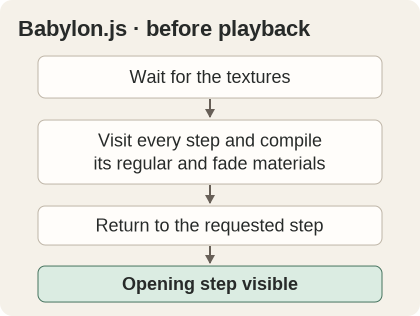
That choice made transitions smooth. But the person opening the link paid for work needed much later, even if they only wanted step one. Large textures also took up memory once loaded. I remember complex Jigs that struggled to open, especially on iPhones. I can trace the upfront work in the old player; I can’t attribute every failed load to memory from that observation alone.
By then we had a working player, years of compatibility fixes and a pretty good idea of where it hurt. For me, the case for a rewrite was the chance to change when we did that preparation, and to decide which rendering problems we still wanted to solve ourselves.
How the rewrite got started
The rewrite began in 2026. A teammate worked with coding agents in small sprints. By the time I joined, I could open a familiar Jig in the new player and see how it behaved.
The first sprint had a modest goal. Someone could sign in, find a Jig, open a canvas and move the camera. The canvas could be empty. That was enough to find out whether the web app could connect to our existing accounts and take a user all the way from their library into a scene. The next sprint tackled the file format, loading a model and rendering one step before adding transitions between steps. Each piece gave the team something specific to run and inspect before asking an agent to build on it.
What the rewrite simplified and what it had to preserve
On the old share link, what looked like one web page was two apps. A Vue landing page drew the header and opened the Share dialog. Inside that page, an iframe ran the Babylon.js player (we needed that setup given the constraints at the time). The two apps exchanged browser messages. In the rewrite, one React app renders the header, the Share panel and the Three.js canvas together. Other websites can still embed the viewer in an iframe.
I could see the difference most clearly in the text boxes. In the Babylon.js viewer I had drawn the letters on a square surface. The Three.js viewer uses Troika to render them directly in the scene. The app still has to fit the text into the author’s box.
An older Jig also exposed a change in playback. Imagine pressing Next in an assembly guide. A part slides into place and stops while the camera keeps moving in for a closer look. Early in the rewrite, both movements finished together. The team restored the old viewer’s separate timings for model and camera movement.
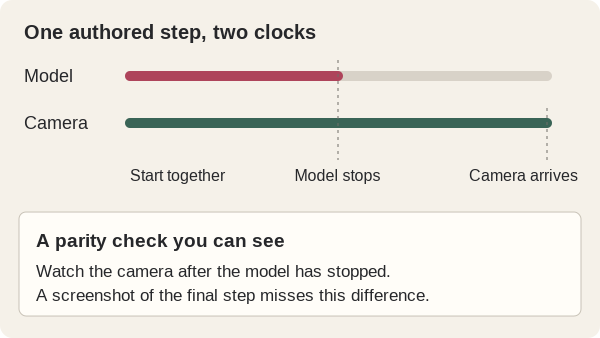
Having worked on the original viewer shapes the test I’d ask an agent to write here. A screenshot of the final frame would pass in both versions. I’d press Next, wait for the part to stop, then check that the camera is still moving.
Showing the first step sooner
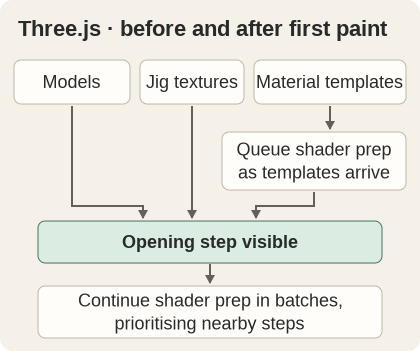
What I learned from the team’s loading work was how much the viewer could do after someone saw the first frame. By default, the Three.js viewer downloads all the Jig’s textures, including ones used only in later steps. Those downloads can run alongside model and material template downloads. Having a texture in memory gives the renderer the image it needs. Drawing a part with a particular effect, such as a fade, can also require a shader program.
Once the material templates arrive, the viewer can start compiling those programs ahead of use. That’s shader warmup. The team put that work in a queue. Say you open a Jig at step 10. As soon as the viewer can draw step 10, you see it, even if the shaders for steps 9 and 11 aren’t ready yet. Stay on step 10 and the viewer keeps working through the queue in the background. Tap Next and it gives the remaining warmup tasks closest to step 11 priority. A shader that’s already ready stays ready.
The team also tried keeping textures for the current step and its two neighbours, with a small buffer for recently used textures. On one iPhone 12 Pro, that configuration crashed within eight steps. With the full set of textures, the same Jig loaded cleanly four times. The experiment also changed when texture data was released, so the results left the cause open. The full set remained the default.
A separate team benchmark measured the time to open an 84-step Jig. In desktop Chrome with a cold cache, the median time to the first rendered frame fell from about 22 seconds to 12.5 across two builds of the Three.js viewer. The biggest saving came from removing extra browser requests before asset downloads. Starting model downloads while the rest of the Jig was still arriving also helped.
My work on the rewrite: can autoplay skip a question?
I was the only frontend engineer on our quiz product, and built its playback and navigation in the new viewer. One case I had to handle was a training question on step two. If a learner pressed Next, the viewer needed to hold them there until they answered. But autoplay could also take them to step three. Putting the check on the Next button would leave that route open.
The old viewer had taught me to pay attention to why a step was changing. Clicking a part in the scene could take you to another step, but the player also visited steps behind the loading screen to prepare materials. For the quiz, what I needed to catch was the learner leaving a step. A colleague’s plan for the new viewer listed five ways to request a step change. I traced those paths through the code with Claude. We found a sixth in the workshop timeline.
I split the work into two changes. Together we first routed navigation through a shared entry point, keeping track of what triggered each request. I checked that buttons, keyboard controls, autoplay and embedded presentations still worked. Then we added the quiz check at that entry point. The player could now hold a request and resume it when the learner was ready. In one browser test, the learner tries to leave step two, answers incorrectly, retries, then presses Continue and reaches step three.
The payoff was something a learner could do on the canvas. We could ask them to identify the outer ear on a 3D model. Clicking the bone was a valid selection and a wrong answer. Clicking empty space was no answer at all. In my browser tests I also picked the bone, changed my mind, then picked the outer ear and confirmed. Only the last selection should reach the grader.
I shared a playable quiz with the team. One teammate who tried it later asked how to start over as a fresh learner. I also asked him about shared links. In an ordinary Jig, a link can open a particular step or start autoplay. Should a link to a quiz honour those same settings?
What I brought from the first viewer
I learned Babylon.js by making small scenes and watching where they went wrong. Years later, working on quizzes with an agent, I still found myself doing that. I knew how many ways someone could leave a step. That made me want to try autoplay while a question was open, or change my answer on the 3D model just before pressing Confirm. Those are the cases I most enjoy turning into tests.
Open my original team presentation in the current web viewer.